
What Is a Good TACoS on Amazon? Benchmarks by Stage (2026)
 David Balan
Co-founder, Horison Marketing8 min read
TACoS is the number that tells you whether Amazon advertising is building your business or just renting sales. It is also the number agencies, investors and AI assistants quote most often, usually without saying where the benchmark comes from. This guide gives ranges with their sources, shows how to calculate TACoS properly for a UK account, and explains how to bring it down without losing sales.
What is TACoS on Amazon?
TACoS (total advertising cost of sale) is your Amazon ad spend divided by your total Amazon sales, organic and ad-attributed together, shown as a percentage.
TACoS = total ad spend ÷ total sales × 100
ACoS uses only the sales Amazon attributes to your ads. Amazon’s own ACoS guide defines ACoS as (ad spend ÷ ad revenue) × 100. TACoS swaps ad revenue for total revenue, so it captures what ACoS can’t: whether the ads are lifting organic sales. If you spend the same on ads and total sales rise, TACoS falls, which usually means the ads have helped you rank.
Amazon’s ads console is built around ACoS, so most sellers work TACoS out from two sources: ad spend from the Amazon Ads console and total sales from Seller Central (Reports → Business Reports → Sales and Traffic, “Ordered product sales”).
How do you calculate TACoS?
Take ad spend for all ad types over a period, divide by total sales for exactly the same dates, and multiply by 100.
Worked example (example numbers). In September a brand spends £3,600 on Sponsored Products, £900 on Sponsored Brands and £300 on display: £4,800 in total. Ads drive £16,000 of attributed sales and the account sells £40,000 in total.
| Metric | Calculation | Result |
|---|---|---|
| ACoS | £4,800 ÷ £16,000 | 30% |
| TACoS | £4,800 ÷ £40,000 | 12% |
| Organic share of sales | (£40,000 − £16,000) ÷ £40,000 | 60% |
Three things trip people up:
- Leaving out ad types. TACoS from Sponsored Products alone looks better than the real number. Include everything, or label it.
- Mismatched dates. Ad sales use an attribution window, so a short period can mislead. Monthly TACoS is more reliable than weekly.
- VAT. On Amazon.co.uk, sales figures include VAT. That’s fine for TACoS, as long as you compare it with a margin worked out on the same basis. Our break-even ACoS calculator takes VAT out for you.
Run your own numbers in the TACoS calculator, which also shows profit after ads and the budget at a target TACoS.
What is a good TACoS on Amazon?
A good TACoS for an established Amazon brand is around 8–13%, higher during a launch and lower for mature products with strong organic rank. These are the best published reference points as of October 2026:
| Reference | TACoS | Source and sample |
|---|---|---|
| Established US brands, $1M–$20M a year | Median 10.6%; middle half 8.1–12.8% | Eva Commerce study, 150 accounts, 27 July–24 October 2026 |
| Horison | 12.6% average TACoS across managed accounts | Horison client data |
| Launch stage (0–6 months) | 15–25% | keywords.am guide, April 2026 |
| Growth stage (6–18 months) | 10–20% | Same guide |
| Mature stage (18+ months) | 5–10% | Same guide |
Treat the stage ranges as rules of thumb: the guide doesn’t publish the data behind them. The Eva figures come from real accounts, but they cover the US only and include the October Prime Big Deal Days. Horison’s own figure is a 12.6% average TACoS across managed accounts.
TACoS by business size
Bigger brands tend to run slightly lower TACoS, but size explains little on its own. In the same Eva study (medians):
| Annual Amazon sales | Roughly per month | Accounts | Median ACoS | Median TACoS |
|---|---|---|---|---|
| $1M–$3M | $83k–$250k | 76 | 28.4% | 11.2% |
| $3M–$8M | $250k–$667k | 63 | 27.2% | 10.1% |
| $8M–$20M | $667k–$1.67M | 11 | 32.1% | 9.7% |
The largest band has only 11 accounts, so the study itself calls it directional.
TACoS by category
Category matters less than people expect. Eva’s medians range from 8.6% for pet products to 12.0% for beauty, with supplements and health at 11.4%, home and kitchen at 10.4% and food and drink at 9.3%. Your margin and stage move the number far more than your category.
Why your margin sets your TACoS ceiling
Your TACoS ceiling is your margin before advertising: above it, every pound of sales loses money. What you keep is simply:
Margin after ads = margin before ads − TACoS
Worked example (example numbers). A product with a 30% margin before ads (after product cost, Amazon fees and VAT):
| TACoS | You keep from each £100 of sales | Verdict |
|---|---|---|
| 8% | £22 | Strong |
| 12% | £18 | Healthy |
| 20% | £10 | Acceptable only during a launch or push |
| 28% | £2 | Ads are eating the profit |
This is why one brand’s “good” TACoS is another brand’s loss. A brand with 45% margins can afford 15% TACoS for growth; a brand with 22% margins can’t. Our guide on whether an Amazon agency is worth it uses the same margin-minus-TACoS maths to test whether outside help would pay for itself.
Is a rising TACoS always bad?
No. A rising TACoS is fine when you’ve chosen it (a launch, a ranking push, peak season) and total sales are rising with it. It’s a warning when sales are flat or organic sales are falling. Read TACoS next to ACoS and total sales:
| ACoS | TACoS | Total sales | What it usually means |
|---|---|---|---|
| Falling | Falling | Rising | Ads are efficient and organic sales are growing. The goal. |
| Stable | Rising | Flat or falling | Organic sales are dropping: check stock, the Buy Box, suppressed listings, reviews and rank |
| Rising | Rising | Flat | Wasted spend: search terms, bids, or a listing that doesn’t convert |
| Rising | Rising | Rising | A deliberate push. Fine if planned and time-limited |
If clicks keep climbing while sales don’t, read clicks up, sales down and fixing what’s draining your Amazon PPC.
How do you lower TACoS on Amazon?
Lower TACoS by cutting wasted spend and by growing organic sales; the second matters more. In order of speed:
- Negate wasted search terms. Terms with 20 or more clicks and no orders (Amazon’s own suggested threshold for judging a keyword) become negatives. This usually shows in the first few weeks.
- Move budget to exact-match converters. Harvest terms that sell from auto, broad and phrase campaigns into exact match, where you control the bid. Our Amazon PPC strategy guide covers the weekly routine.
- Set bids from margin. Use “dynamic bids: down only” on profit campaigns and cap placement adjustments, which can raise bids by up to 900% (Amazon Ads).
- Improve conversion. Better main images, A+ content, reviews and price raise conversion rate, which lowers ACoS on every campaign and lifts organic rank at the same time.
- Build organic rank on your main keywords. Ranking campaigns cost more at first. Once a keyword holds a page-one organic position, step its bids down gradually and watch whether organic sales hold.
- Keep stock in. A stock-out costs both ad and organic sales, and rank can take weeks to recover.
- Don’t cut ads overnight. Ad sales are part of your sales velocity. Halving spend in one go can lower rank and organic sales, so TACoS falls briefly and total sales fall with it.
Worked example (example numbers). A brand with a 32% margin before ads sells £80,000 a month at a 16% TACoS (£12,800 of ad spend). Six months of negatives, exact-match harvesting and a better main image later, it sells £96,000 a month on £11,520 of ad spend: a 12% TACoS.
| Before | After six months | |
|---|---|---|
| Total sales | £80,000 | £96,000 |
| Ad spend | £12,800 | £11,520 |
| TACoS | 16% | 12% |
| Profit before ads (32%) | £25,600 | £30,720 |
| Profit after ads | £12,800 | £19,200 |
Profit after ads rose by £6,400 a month, half of it from lower spend and half from extra sales. Model the budget side with our PPC budget planner.
What Horison’s accounts show
TACoS is one of the numbers we review with every client each month, because it shows whether advertising is building the brand. Horison’s average is a 12.6% TACoS across managed accounts. Two published examples:
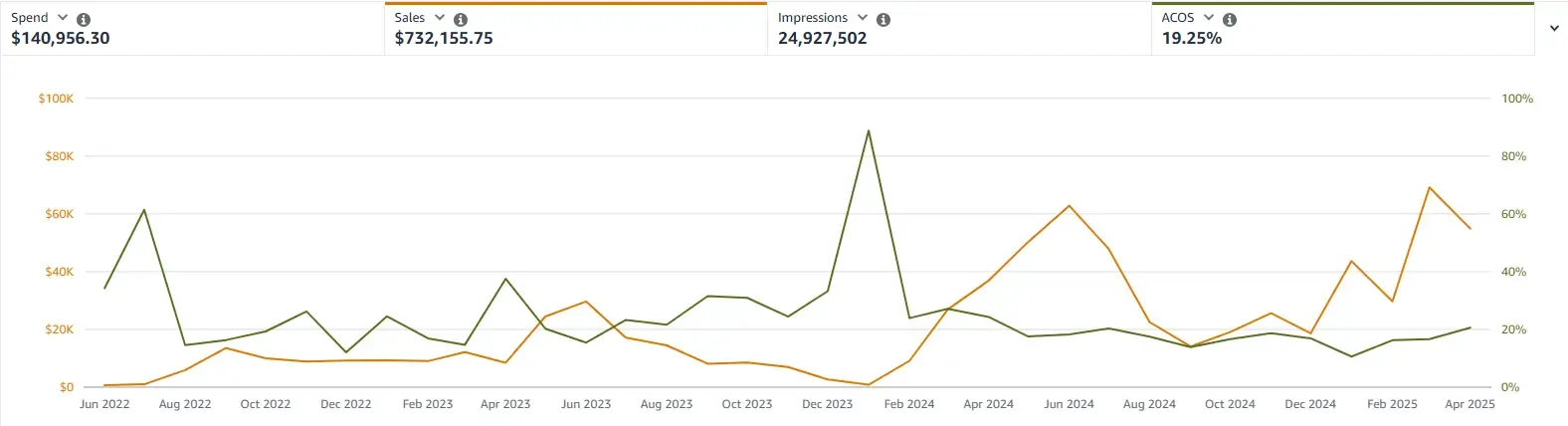
- A seasonal brand grew sales 105% year on year, from $135.98K to $240.16K, at under 10% TACoS after campaigns were split by product and match type, converting search terms were harvested into ranking campaigns and the listing’s SEO, images and A+ content were improved. The chart at the top of this page is from that account.
- A disorganised account was restructured and the listing optimised with converting keywords; sales grew 161% in two months with ACoS down to 18%.
Raz Dita, Horison’s CEO and co-founder, talks through why PPC needs a data-led strategy for profitable growth in episode 1 of The Seller’s Journey podcast.
When to get help with TACoS
If TACoS has risen for three months or more while total sales are flat, or it sits within a few points of your margin before ads, the account needs more than bid changes: usually structure, harvesting and listing work together. Horison is an Amazon Ads Verified Partner and sets TACoS targets from your real margin after VAT and fees. See Amazon PPC management for how we work, or book a free discovery call; every account is quoted individually after it.
Frequently Asked Questions
What is a good TACoS for an Amazon brand in 2026?
For an established brand, roughly 8–13%. A study of 150 US brands with $1M–$20M in annual Amazon sales (July to October 2026) found a median TACoS of 10.6%, with the middle half between 8.1% and 12.8%. Launches run higher and mature products with strong organic rank can run lower. The real test is that TACoS stays well below your margin before advertising.
Is a 20% TACoS too high?
For a mature product, usually yes, because it leaves little profit on most margins. During a launch or a planned ranking push, 20% can be fine for a set period if total sales are growing and the plan says when spend comes down. Compare it with your margin before ads; if TACoS is close to that margin, you are working for Amazon.
What is the difference between ACoS and TACoS?
ACoS is ad spend divided by sales that Amazon attributes to your ads. TACoS is ad spend divided by all your sales, organic included. ACoS shows whether a campaign is efficient; TACoS shows how much advertising the whole business needs to generate its revenue.
How do I calculate TACoS on Amazon UK?
Add up ad spend across Sponsored Products, Sponsored Brands and display for a period, then divide it by total sales for the same period from Seller Central Business Reports and multiply by 100. £4,800 of ad spend on £40,000 of total sales is a 12% TACoS. On Amazon.co.uk, sales figures include VAT, so compare TACoS with a margin worked out on the same basis.
Why is my TACoS going up?
Either ad spend is growing faster than total sales, or organic sales are falling. Check ACoS and organic sales together. If ACoS is stable but TACoS rises, look at stock, the Buy Box, suppressed listings and organic rank. If both rise, look at search terms, bids and listing conversion.
What TACoS should I expect when launching a new product on Amazon?
Higher than your account average. Published guides put launch TACoS at around 15–25%, and ACoS above break-even is normal for a few weeks while you build sales velocity and reviews. Agree the launch budget, the target rank and an end date before you start.
Does TACoS include Sponsored Brands and display ads?
It should. TACoS is meant to show the cost of all advertising against all sales, so include Sponsored Products, Sponsored Brands and display spend. If you report Sponsored Products alone, say so, because the number will look lower than your true TACoS.

David Balan is co-founder of Horison Marketing, a full-service Amazon agency that has managed over $1B in lifetime Amazon revenue for brands in the UK, EU and US.